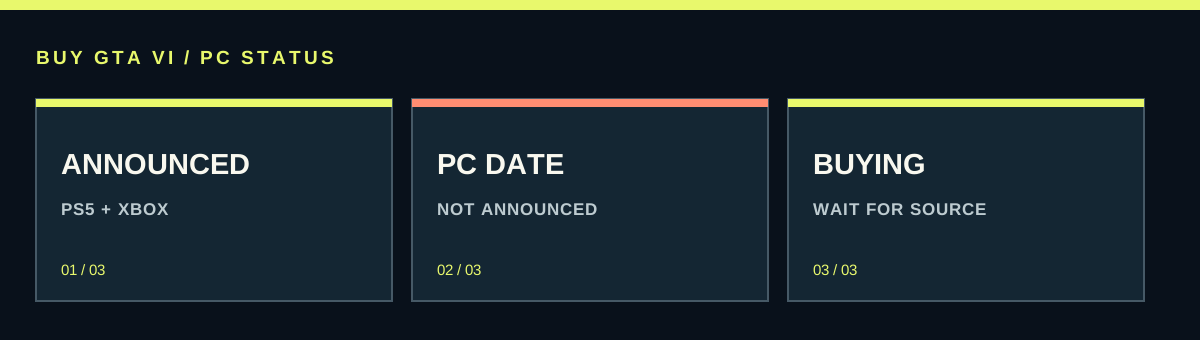
As of this update, Rockstar’s official GTA VI platform and preorder pages name PlayStation 5 and Xbox Series X|S. They do not announce a PC version, PC release date or PC system requirements. November 19, 2026 is the scheduled announced-console release, not a confirmed PC date. Keep your PC purchase or upgrade budget flexible until Rockstar provides PC-specific information.
Worth knowing first
- An announced console release date is not a PC release date.
- There are no official GTA VI PC requirements to build a reliable parts list around yet.
- A PS5 or Xbox purchase does not establish ownership of a future PC edition.
| Question | Current evidence | Practical result |
|---|---|---|
| Can I preorder the announced PC version? | Official current platform pages list consoles | Do not treat a third-party PC listing as a publisher announcement |
| Will my PC run it? | PC requirements have not been announced | Avoid a GTA VI-only hardware upgrade based on guessed specifications |
| Will a console copy include PC? | No announced PC entitlement in the current products | Budget a potential future PC purchase separately |
| Should I buy a console now? | Announced versions support PS5 and Series X|S | Compare the entire setup with your desire to play at console launch |
What is confirmed, and what is still missing
The current official GTA VI site and Rockstar’s platform support list identify PS5 and Xbox Series X|S. Those are the announced platforms for the scheduled November 19, 2026 release. A PC player should read that as a console announcement rather than quietly adding Windows to the list.
A PC version, a date for it, supported stores and PC system requirements are separate facts that need their own announcement. None can be worked out reliably from the console preorder page. Not announced also does not mean never happening. It means there is no confirmed PC product here to use as the basis for a purchase today.
This distinction is useful because headlines often blend expectation with confirmation. A writer may expect a PC edition and discuss a possible year. That is a prediction unless it leads to a specific publisher statement. Treat the prediction as a discussion, not as a promise that your money can buy.
How to judge a PC release-date claim
Look for the original announcement and read its platform line. If the only evidence is a screenshot, a retailer placeholder or someone quoting another account, the claim has not yet reached the same level as a Rockstar announcement. A repeating rumor can become familiar without becoming confirmed.
Pay special attention to which date is being discussed. A story about the announced console launch can appear in a search for GTA VI PC release. The number may be accurate for consoles while answering a different question. Read the actual product and platform instead of copying a date from a search snippet.
The most useful places to return are Rockstar’s GTA VI page, its Newswire and official platform-support information. You do not need to check several rumor videos every day. Until a PC announcement exists, a saved reference and a flexible budget give you more useful control than another guessed month.
A console preorder is not a future PC preorder
The current game products are identified for their respective console ecosystems. Buying a PS5 or Xbox copy gives the rights described by that product. A Rockstar account does not by itself turn those platform purchases into one license for every machine you own.
If you want to play on console first and PC later, treat those as potentially separate purchases. Do not assume that an edition, bonus, save or upgrade will transfer to an unannounced PC release. Each of those would need specific support and terms when such a version is announced.
For example, a player who buys console Ultimate because they want its extra activities should value it for the announced console experience. Buying it mainly to secure imagined PC extras is a different and unsupported calculation. Choose the present product for what is actually offered.
Why a guessed requirements list is a poor shopping list
A list of processor, graphics card, memory and storage figures can look official simply because it is neatly formatted. Without a publisher source, it is still an estimate. You cannot establish an exact GTA VI PC requirement by looking at the game’s console footage or the hardware inside a PS5.
Console and PC games run in different hardware and software environments. Even when their broad technical ideas overlap, that does not translate into an exact PC minimum, a recommended graphics card or a guaranteed frame rate. A console presentation also does not reveal every condition used to capture it.
If your current computer needs an upgrade for work or games you already own, evaluate that upgrade on those known needs. If the sole purpose is a future GTA VI PC edition, waiting keeps you from spending now on a part that may not suit the eventual requirements, available settings or price.
What future PC requirements would need to explain
When an official PC specification is published, read more than the word recommended. Look for the target resolution, settings and expected performance attached to it. A minimum specification generally describes a different goal from a high-resolution, high-refresh setup, so the intended experience matters.
Check the complete system rather than comparing just a graphics-card name. Processor, memory, storage type, free space and operating-system support can all matter. For a laptop or handheld PC, cooling and power limits can also affect what a familiar chip name delivers in sustained play.
Then compare the real specification with your own machine and wait for reliable measurements if performance is central to your purchase. This is a method for a future decision, not a hidden current requirements list. There is no benefit in pretending those missing target numbers are already known.
PC, streaming and Remote Play are different things
A native PC version runs the game software on the PC. Remote Play instead sends the image and controls from another supported gaming setup to your screen. Sony lists Remote Play support for the PS5 game, but that feature does not make the announced product a standalone Windows edition.
If you already have a compatible console and want to use another screen, a supported remote-play setup may be worth examining through the platform’s own instructions. Its experience depends on the console, account and connection involved. You still need the underlying console game access; a laptop screen does not replace it.
Likewise, a rumor about cloud play is not a confirmed cloud product or a PC release. Check the exact service, supported game, region and purchase conditions before paying for a subscription on that basis. A general ability to stream some games says nothing definite about this particular title.
Waiting versus buying a console for launch
If your priority is keyboard-and-mouse play, your existing PC library or avoiding another hardware purchase, waiting is a sensible position. You keep the money and avoid forcing a console decision simply because the announced launch is highly anticipated. Waiting does not require predicting how long a PC release might take.
If experiencing the announced console release matters more, compare a full compatible setup. Include the console, the game, any genuinely needed accessories and your download situation. Use the television or monitor you already own if it meets your needs. Do not turn the purchase into an unnecessary complete room upgrade.
A hypothetical budget makes the difference clear: saving 10 units on the game does little if you spend hundreds on hardware you would otherwise not use. The console becomes more worthwhile when you also want its wider library and household use. That is a personal value judgment, not proof that one option is best for all PC players.
Be careful with supposed PC keys and downloads
A retailer may display a PC placeholder before a publisher has announced a product. That page cannot establish the release date, delivery or platform entitlement by itself. If the official product does not exist in the current announcement, treat an offer to sell its key as unresolved rather than as a normal confirmed preorder.
A page promising a leaked PC build, an exclusive launcher download or a beta should also lead to a genuine publisher announcement before you install anything. A familiar logo is easy to copy. Start from the official site instead of granting a random program access to your computer because its filename says GTA VI.
If you already paid for a supposed PC copy, save the listing and receipt, then ask the seller what exact product and delivery promise were sold. Use the appropriate payment or seller-support route if that promise cannot be substantiated. Do not redeem a console code as a test or pay an additional fee to unlock an unannounced product.
A useful plan while the PC details are unknown
Keep a short decision note: your current PC, the amount you are willing to spend and whether console launch matters enough to justify another system. Leave the unknown fields unknown. You can update the note when there is a real PC platform announcement, release date, store page and hardware target.
Avoid making several uncertain purchases at once. A new graphics card, a console copy and a future PC copy can become an expensive chain if each is justified by a different rumor. Buy something now only when its current use already makes sense to you.
For today, the clear answer is limited but useful: announced console versions have a scheduled release, while PC-specific purchasing and hardware information has not been announced on the official pages checked. Use that boundary to protect your choices, and revisit the decision when the publisher supplies the missing facts.
Source desk
Product details checked October 13, 2026. Live store terms can change.
- Rockstar: current GTA VI announcement and platform list ↗ Checked October 13, 2026
- Rockstar: available preorder platforms and versions ↗ Checked October 13, 2026
- Rockstar Newswire: official GTA VI announcements ↗ Checked October 13, 2026
- PlayStation: PS5 features and Remote Play support ↗ Checked October 13, 2026